The Best Time to Post on LinkedIn: Test Three Moments and Optimise on Data
Best time to post on LinkedIn in 2026: the strongest days and hours based on real data, plus the slots where your post gets almost no reach.
When is the best time to post on LinkedIn?
The best times to post on LinkedIn in 2026 are Tuesday to Thursday, between 7:30-8:30 in the morning or 12:00-13:00. The first hour after publishing is crucial for the LinkedIn algorithm: the more interaction in that hour, the bigger your reach.
Highest interaction rate
On average 2.3x more reach
Up to 60% fewer impressions
The first hour determines your reach
Optimal posting times per day
Professional start to the week. Focus on career and productivity.
Tuesday is when most posts get read. Ideal for thought leadership.
Lunch break peak. Good for short, visual content and polls.
Second-best day. Excellent for job vacancies and case studies.
Lower reach, but less competition. Good for informal content.
Very low interaction. Only post if your niche requires it.
- Post between 7:30-8:30 on Tuesday to Thursday for maximum reach
- Respond actively within the first hour to trigger the algorithm
- Test three different times and compare your impressions
- Use LinkedIn Analytics to check your network's active times
- Don't post at weekends. Impressions drop by 40-60%
- Don't publish after 18:00. The business audience is offline
- Don't delete a post if it gets little interaction within 30 minutes
Reach by time of day compared
| Morning (7-9h) | Midday (12-14h) | Late afternoon (15-17h) | Evening (18-21h) | |
|---|---|---|---|---|
| Average reach | Very high | High | Average | Low |
| Interaction ratio | 2.3x average | 1.8x average | 1.2x average | 0.7x average |
| Competition | High | Average | Low | Very low |
| Best content | Thought leadership | Polls & visuals | Case studies & tips | Personal |
- Post on Tuesday, Wednesday or Thursday
- Choose a time slot: 7:30 or 12:00
- Prepare your post the evening before
- Reply to the first 5 comments within 30 minutes
- Check your Analytics after 4 hours for impressions and engagement
- Test a different time of day next month and compare
Send your messages and posts at the peak: Tuesday to Thursday, between 08:00 and 10:00. Work-related engagement drops sharply at weekends.
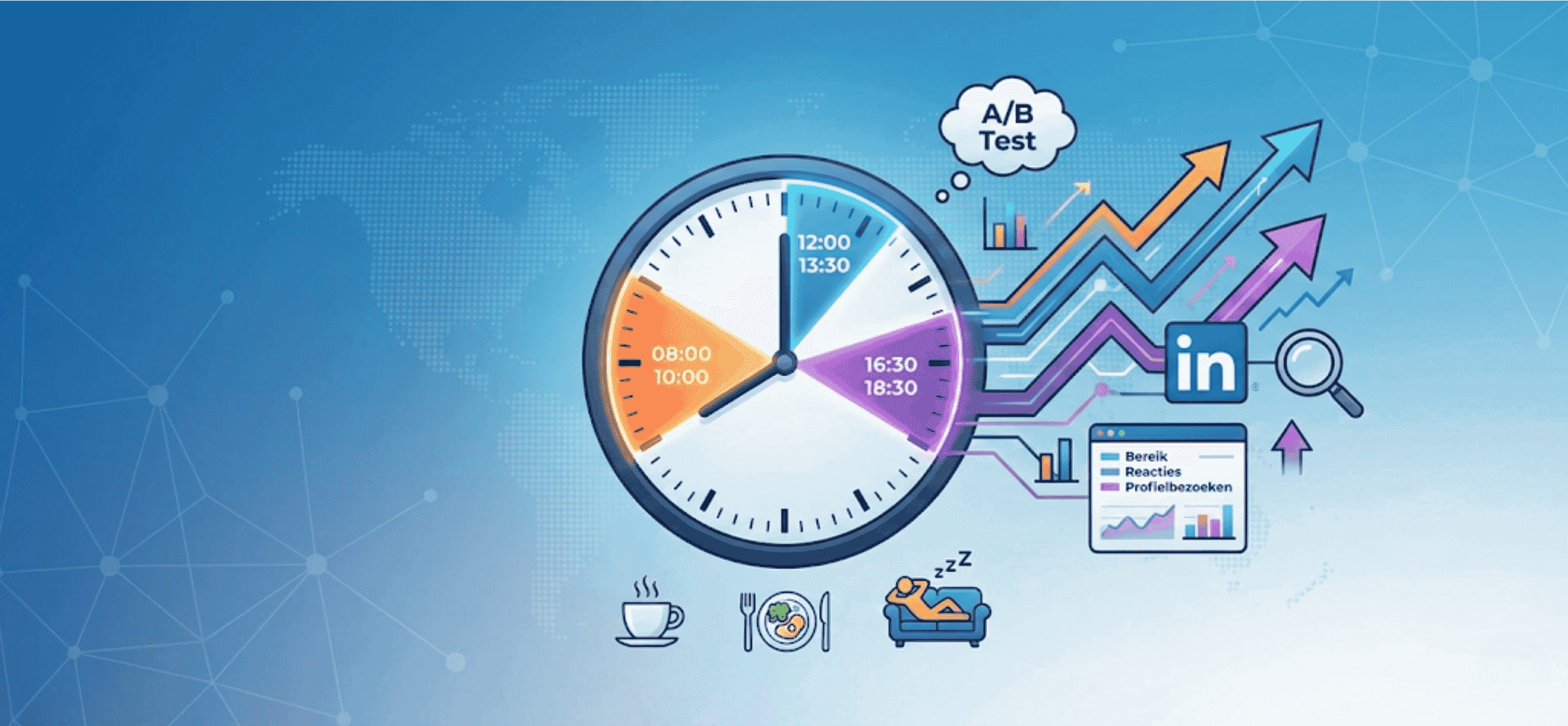
The best time to post on LinkedIn is usually on weekdays between 8am and 10am, during lunch from 12pm to 1:30pm, or towards the end of the day around 4:30pm to 6:30pm. At those moments your audience tends to be active, which matters because the algorithm looks mainly at engagement within the first hour. More replies or clicks in that early phase make your post more visible. Which time works best depends on your audience, content type and goal. That's why it pays to plan test moments and then optimise based on real data, not gut feeling.
- LinkedIn looks mainly at the first 60 minutes to decide how many people get to see your post.
- Weekdays are usually better than weekends, but some audiences are actually more active on Saturday or Sunday.
- Job posts work well in the morning or during lunch; stories or reflections do better later in the day.
- Start by testing three time windows: 8am–10am, 12pm–1:30pm and 4:30pm–6:30pm.
- Always measure reach, replies per 1,000 views and profile visits within 24 hours to spot patterns.
Why timing matters on LinkedIn
When you post something on LinkedIn, the platform first shows it to a small part of your network. In the first 60 to 120 minutes, the algorithm watches whether people click, like or comment on it. If that happens, your post gets shown to more people. That's why timing makes such a big difference. Post at a time when your audience is active, and you're more likely to get replies quickly. More engagement early on means more visibility.
Three time windows to test
There's no fixed answer to when you should post. Still, certain time windows stand out. These three moments tend to deliver good results and are a solid starting point for your own testing strategy:
- 8am to 10am: many people scroll before starting work
- 12pm to 1:30pm: lunchtime leaves room for short updates or job posts
- 4:30pm to 6:30pm: at the end of the working day, people are more likely to read personal or reflective content
Match your timing to the content. Job posts or concrete calls to action tend to work well in the morning or at lunch. For storytelling or looking back, the evening works better. Don't treat these time slots as fixed rules but as starting points for tests. Also factor in variation across weekdays and public holidays.
Weekdays or weekends?
Most LinkedIn users are more active on weekdays than at weekends. Start with weekdays, preferably Tuesday, Wednesday or Thursday. That said, there are exceptions. Certain audiences, such as IT professionals or healthcare workers, check their social media on Saturday or Sunday instead. So it's worth testing an occasional weekend post and comparing it with your weekday results. In the weekend, lean towards slower-paced content, such as blog links or videos.
Time zones, audiences and industry differences
If you're hiring internationally, you also need to factor in time zones. For a post aimed at Spain, Central European time works fine, but for South America the right posting moment is much later. Behaviour also differs by industry. People in finance start early. Developers and marketers tend to be active later in the day. If you're working across a broad audience, for example for the needs of recruitment agencies, it pays to use test moments per segment. That way you match posting times to real behaviour.
How do you start testing?
An effective way to test is the A/B approach. Pick one clear post type, such as a job post. Publish the exact same post on different days and times. Repeat this several times. Then collect the following data per post:
- Impressions per follower
- Number of comments or likes per 1,000 views
- Number of profile visits within 24 hours
Only compare like-for-like situations. A job post on Monday is different from a retrospective on Friday. Keep your test set deliberately narrow and repeat it to spot reliable patterns. That's how you make your LinkedIn planning more effective step by step.
Rhythm, consistency and spacing between posts
There's no benefit to six posts in one day. Two to four posts a week is realistic and effective for most recruitment teams. Leave at least six to eight hours between two posts. This stops posts from competing with each other for attention. A repeatable pattern, such as every Tuesday and Thursday at 9am, builds recognisability. Working with fixed formats or series on top of that adds extra structure. Take a look, for example, at our tips for repeatable routines within content calendars.
Quality beats timing
The question "when should I post?" matters less if your post isn't strong to begin with. Make sure you have a clear title and opening line. Show straight away what the topic is and why someone should keep reading. Be clear about your goal: do you want replies, clicks or profile visits? Always pick one main goal per post. Only use visuals if they support the message. A video takes more time to watch, so plan it around lunch or the end of the working day. Avoid vague calls to action such as "like if you recognise this" and ask a real question instead, one that leads to interaction.
Internal engagement and follow-up
Posts with early replies do better. Colleagues can actively contribute to that. If they reply or ask a relevant question shortly after publishing, LinkedIn treats that as relevant, and reach grows. Reply quickly yourself to incoming comments too. In this real-world example of follow-up you can see how replying fast leads to concrete next steps. Keep that line personal, and move to direct contact where it makes sense.
Checklist per posting moment
Use this step-by-step plan for every moment you plan a post:
- Make sure you have a title with clear content and a visual
- Ask one substantive question or give a clear call to action
- Post manually within your chosen time window
- Actively watch for replies and respond within the first hour
- Check reach, replies and profile visits 24 hours later
What we offer around timing and follow-up
We don't automate the posting of content. What we do support is what comes after. You can see, for example, who viewed or liked your post, and then plan personal actions off the back of that. Think of sending an invite or an InMail. Our integrations for LinkedIn workflows make it easier to link your follow-up to your content rhythm. That way, timing becomes not a one-off action, but a logical part of your broader strategy.
FAQ
When is the best time to post job vacancies on LinkedIn?
The morning between 8am and 10am, or around lunch from 12pm to 1:30pm, usually works well for job posts.
Why does the first hour after posting matter so much?
LinkedIn measures how people respond in that first hour. If engagement is high, your post gets shown to more people.
Can I post on the weekend too?
Yes. For some audiences, the weekend actually works well. Test it, for example on Saturday morning, and compare it with your weekday results.
How much time should I leave between two posts on LinkedIn?
Leave at least six to eight hours between two posts. That way you avoid them competing for attention.
Does Elvatix offer a tool to post automatically at the right time?
No. But we do help you automatically act on likes and views further down your recruitment process.
You learn timing by measuring and repeating. Start with fixed test moments, keep it simple, and evaluate per audience and content type. Keep an eye on seasons and industry events. Want to talk through your timing strategy? We're happy to think it through with you and help you find out what works for your team.
Want your outreach timed for the best moment?
Combine the right timing with the right copy. Elvatix makes sure your message lands exactly when the candidate opens LinkedIn.