LinkedIn Connection Request Limit Per Week in 2026
The LinkedIn connection request limit per week sits around 100 to 200 invitations in 2026. Learn how acceptance rate, pending invites and timing affect it.
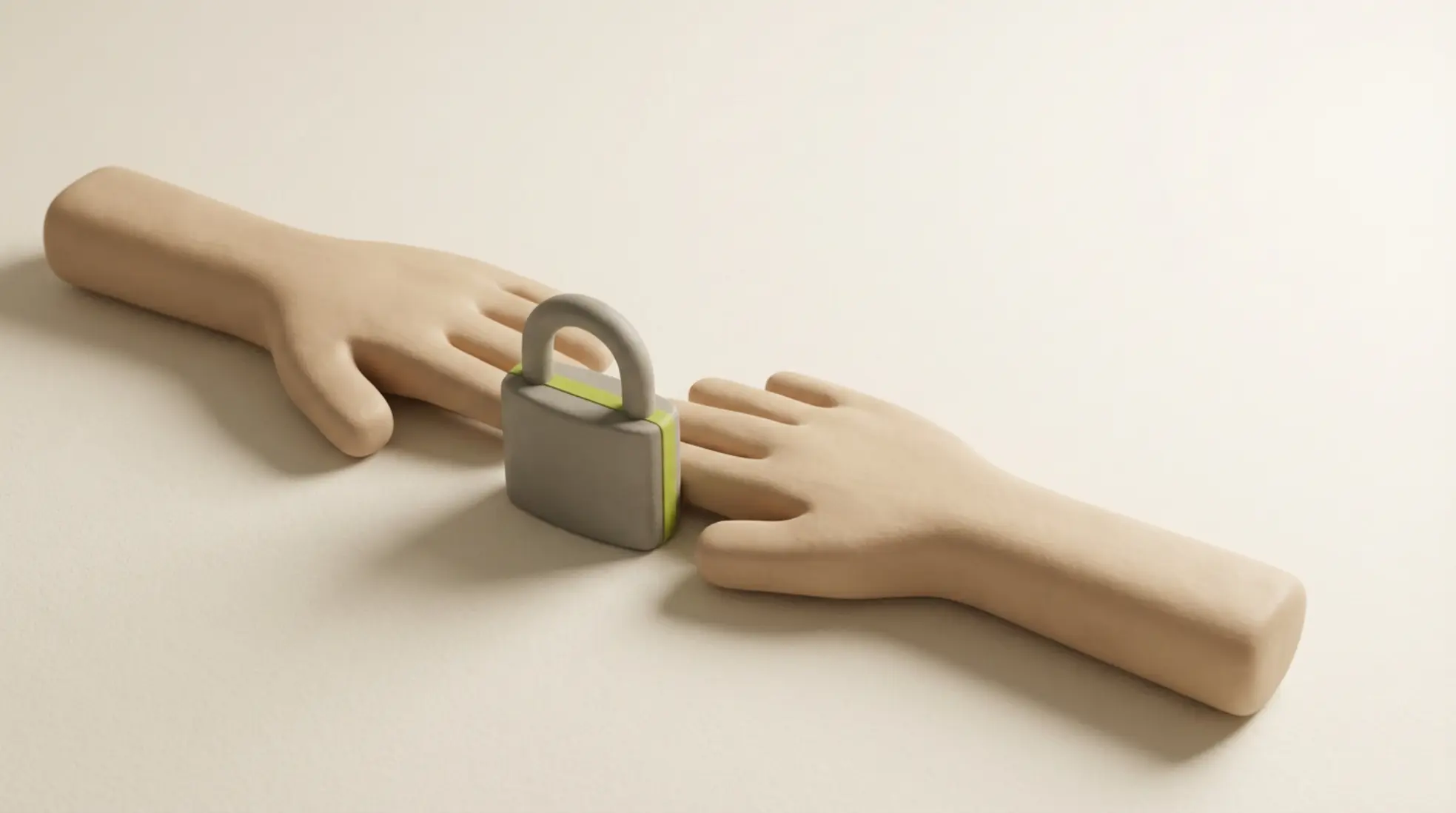
The LinkedIn limit in 2026 is dynamic and sits between 100 and 200 requests per week, where a high acceptance rate and good spread are essential for keeping your account safe. Focus on quality over volume to avoid blocks and grow your reach sustainably.
The LinkedIn connection request limit per week usually sits between 100 and 200 invitations in 2026. It isn't a fixed number, because LinkedIn also looks at your behaviour, your acceptance rate, and how many invitations you already have pending. Accounts with a high acceptance rate and few pending requests get more headroom. That's why a steady, consistent approach works best.
This article explains how the LinkedIn weekly connection request limit works and how to get more out of it without putting your account at risk.
- Most accounts have room for 100 to 200 invitations a week.
- Your acceptance rate and pending requests determine your actual limit.
- Spreading invitations evenly across the day lowers the risk of restrictions.
- Quality always beats pure volume when it comes to results.
What is the LinkedIn connection request limit per week in 2026?
The LinkedIn weekly limit in 2026 is dynamic. Most users can send between 100 and 200 connection requests a week. New accounts often start a little lower, while accounts with strong performance get more room.
LinkedIn looks at your connection request acceptance rate, your historical behaviour, and the number of pending LinkedIn invitations you're sitting on. Signals such as reports also play a part. As a result, the limit feels slightly different for every user.
How does the LinkedIn weekly connection request limit actually work?
The limit runs on a rolling seven-day window. From the moment you send an invitation, it counts towards your total for seven days. That makes good timing genuinely important.
Sending a large number of LinkedIn connection requests in one go carries extra risk. An even spread creates a far more natural pattern. Think ten to fifteen invitations per working day rather than sudden spikes.
So the LinkedIn invitation limit isn't a hard cap per calendar week, but a rolling system that constantly adjusts.
What factors affect your LinkedIn connection request limit per week?
The biggest factor is your acceptance rate. If a lot of people accept your invitation, LinkedIn reads that as relevant behaviour. You then get more room to send new requests.
The number of pending LinkedIn invitations you have also matters a great deal. A large pile of unanswered requests drags down your reach. Regularly clearing your list helps keep your account healthy.
User reports and complaints carry real weight too. LinkedIn can impose a restriction on your invitations, or even start a LinkedIn account review for invitations. Your past behaviour on the platform determines how strictly this gets applied.
Want to know what a healthy benchmark looks like? Take a look at our recruitment statistics and compare your results with the wider market.
Write a personal message right here
Enter a name or LinkedIn URL and get a personalised message within 30 seconds. No account needed.
What happens if you go over the LinkedIn connection request limit per week?
If you consistently send too many requests, you'll usually get a warning first. After that, LinkedIn can temporarily block you from sending new invitations. This restriction can last several days.
Repeat the pattern and your account gets reviewed manually. During a LinkedIn account review for invitations, your actions get restricted even further. Recovering from this takes time and depends heavily on your past behaviour and your current acceptance rate.
How do you get more out of the LinkedIn weekly connection request limit?
Sending more rarely gets you more. A higher acceptance rate leads to more conversations with considerably less volume. That's why relevance should always be the focus.
Work with clear segments and target one specific audience per campaign. Write short messages that genuinely match the recipient's situation. This significantly increases the odds that someone accepts your request.
We support this with our module for a personalised connection request. It keeps your outreach scalable and relevant, so you get the most out of the limit you have available.
The difference between no note, a standard note and a personal note
Leaving out a note works well when there's shared context, such as working at the same organisation or belonging to the same group. Standard notes, on the other hand, often get ignored because they're too generic. A short, personal note creates instant recognition and, with it, a higher acceptance rate.
Best timing and rhythm within the LinkedIn connection request limit per week
The best time to send a LinkedIn connection request is usually in the morning on a regular working day. Tuesday to Thursday tend to perform particularly well in practice. Since this varies by audience, testing is still worthwhile.
A steady rhythm helps enormously in staying within the limits. Sending a small number of invitations every day builds your network in a stable way and avoids the noticeable spikes that carry risk.
Situations, risks and recommended actions
- Too many invitations in one day: this raises the risk of restrictions. Spread your sends across several days instead.
- Low acceptance: this reduces your reach over the long term. Improve your targeting and the content of your messages.
- Many pending requests: this lowers your account score. Regularly remove old, pending LinkedIn invitations.
- Generic messages: these lead to a much lower response rate. Write short, relevant messages aimed specifically at your audience instead.
Practical guidelines for safe LinkedIn outreach
Work in small batches and keep a close eye on your results. Measure your acceptance rate per audience and adjust promptly when it drops. Also clear out old, unanswered requests every month to free up room again.
Don't use the same generic templates for everyone either. That lowers your acceptance rate and increases the risk of account restrictions at the same time. Safe LinkedIn outreach ultimately comes down to relevance and the right timing.
A daily approach for recruiters
Plan your outreach well in advance and work systematically with fixed segments. Also keep track of exactly how many invitations you send and what result they produce. That quickly shows you where there's still room to improve.
A clear structure matters especially for teams. On our dedicated page for corporate recruiters, we show in detail how to organise this well without losing speed.
In this case study, you can read how better personalisation directly led to more accepted requests and far less waste of the available invitations.
Why quality always beats volume
A higher acceptance rate simply means you need fewer invitations for the same end result. This considerably lowers the risk of restrictions and also leads to better, more valuable conversations.
The connection request limit for recruiters always stays closely tied to your account's behaviour. That's why it genuinely pays to invest in quality, rather than scaling up endlessly with no real control.
Frequently asked questions about the LinkedIn connection request limit per week
How many LinkedIn connection requests a day is safe?
For most regular accounts, this sits between ten and twenty per working day. The exact number does depend on your acceptance rate and your overall account history.
Does LinkedIn Recruiter have a different limit?
The base limit stays the same. Although Recruiter offers plenty of extra features, your actual limit always depends on your personal account behaviour.
Do withdrawn invitations still count?
Yes, every invitation you send counts towards the seven-day period. Withdrawing one does, fortunately, help keep your account clean and tidy.
What exactly counts as a good acceptance rate?
This naturally varies by audience, but as a general rule: the higher your rate, the more room LinkedIn will give you.
Steering growth and account health
The LinkedIn connection request limit per week keeps shifting over time. Anyone who deliberately focuses on acceptance, good timing and genuine relevance stays comfortably within the limits and simply gets more out of every invitation sent.
Want to structurally improve your approach? Feel free to get in touch with us. We're happy to help you make your outreach smarter and safer.
Write a personal message right here
Enter a name or LinkedIn URL and get a personalised message within 30 seconds. No account needed.
Scale your LinkedIn network safely, risk-free?
Elvatix helps you stay within LinkedIn's safe limits with advanced campaign management tools and smart invite spreading. Boost your acceptance rate through sharp segmentation and personal outreach.