LinkedIn Connection Request Limit: How Many Can You Safely Send Per Week?
What's a safe LinkedIn connection request limit per week? See the numbers, the risks and how recruiters can monitor their volume without getting flagged.
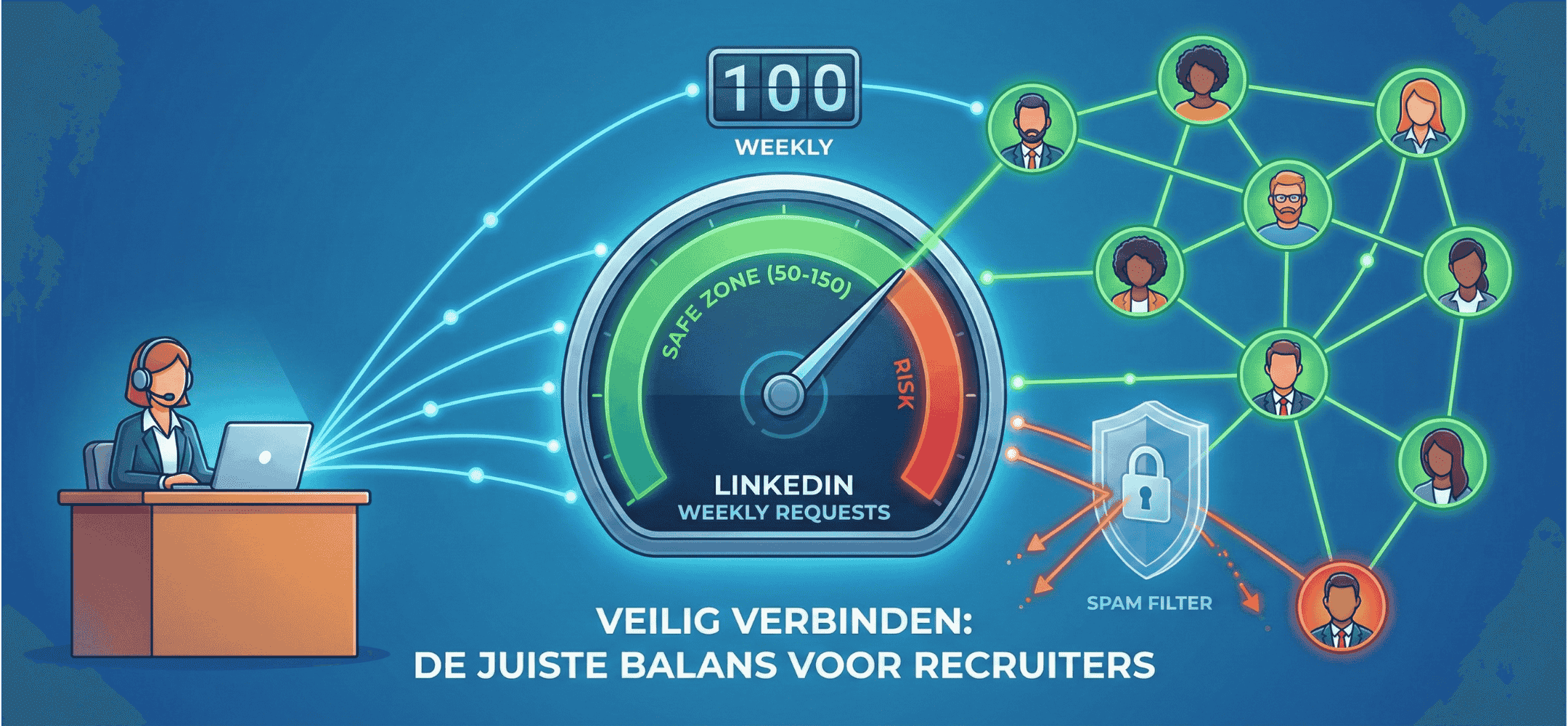
LinkedIn enforces strict dynamic limits of around 100-200 per week, depending on your acceptance rate. Safety and conversion beat volume.
A safe LinkedIn connection request limit sits between 50 and 150 per week for most recruiters. New profiles are best off staying under 70 a week. Active accounts with a solid reputation can move towards 150, as long as they pick relevant connections and keep a healthy acceptance rate. There's no single official cap that applies to everyone. LinkedIn runs an algorithm that looks at your behaviour, the quality of your profile, and how often your invitations get accepted. This article shows which numbers hold up in practice as safe, and how to work smartly within LinkedIn's limits.
- New accounts are best off staying under 70 connection requests a week, spread across several days.
- For active recruiters, a safe range is 100 to 150 a week.
- An acceptance rate above 40% helps you stay visible as a trustworthy profile.
- Too many invitations in a short window can trigger warnings or a temporary LinkedIn connection request restriction.
- Keep your invitations personal and relevant to get more replies without adding extra volume.
What determines a safe LinkedIn connection request limit for your situation?
LinkedIn limits how many invitations you can send to protect users from spam and impersonal outreach. The exact LinkedIn weekly invitation limit isn't shared publicly. That makes the ceiling flexible, depending on your behaviour and profile history. Key factors include:
- Age of your account: older profiles with a stable network get more room.
- Acceptance rate: if a lot of people decline or ignore your invitation, LinkedIn may restrict you.
- Number of pending requests: too many "pending" invites can trigger a limit. Regularly clearing out pending LinkedIn invitations helps keep your profile tidy.
- Relevance of your audience: reaching out to a focused group is seen as more trustworthy than broad, random outreach.
Many recruiters search for an answer to how many connection requests per week feels safe on LinkedIn without invitations getting blocked. That largely depends on how "healthy" LinkedIn judges your profile behaviour to be.
Guidelines for the LinkedIn connection request limit most profiles can work with
There are practical guidelines that help you stay within safe margins. The figures below aren't official LinkedIn figures, but they give recruiters a benchmark based on real-world experience:
- New or low-activity profile: 10 to 20 unique invitations a day, up to a maximum of 70 a week.
- Active profile with good engagement: 20 to 30 a day, up to a maximum of 150 a week.
Always spread your invitations across several days and times. Big spikes increase the chance of being flagged. A steady, calm rhythm looks more trustworthy to the algorithm.
Building up carefully with new or low-activity accounts
If your account is new or has been inactive for a long time, it's wise to start with smaller volumes:
- Keep it to 10 to 20 invitations a day.
- Spread these across at least four to five days a week.
- Avoid bulk actions, such as dozens of invitations in a single session.
Higher volumes for experienced recruiters with a healthy profile
Do you have a well-filled profile and are you consistently active in LinkedIn Recruiter or Sales Navigator? Then you can comfortably build towards 150 connections a week. Just keep in mind:
- Never send 100+ requests in one go; spread them evenly instead.
- Use your acceptance rate as a gauge. Below 25% is a signal to adjust your approach.
Here's a quick summary of the guidelines:
Profile type: New or low activity
Per day: 10 to 20
Per week: 50 to 70
Note: Build up steadily, monitor closely
Profile type: Experienced and active
Per day: 20 to 30
Per week: 100 to 150
Note: Adjust based on acceptance rate
How many connection requests a week LinkedIn allows without a block: risks and warning signs
Too many invitations in a short time sometimes leads to soft warnings, but also to visible consequences such as LinkedIn invitations getting blocked or a temporary LinkedIn connection request restriction. Watch for these signals:
Signs you're pushing your profile too hard
- A notice telling you to cancel existing requests before you can send new ones.
- Your invite button disappears or gets a warning label.
- Connections accept less often than usual.
As an extra warning, LinkedIn can temporarily disable profile options or limit your visibility. Even if you're technically still allowed to send invitations, your reach can be scaled back.
Why aggressive automation is especially risky
Automation tools that send invitations automatically or try to bypass limits significantly raise your risk. Even though they promise to work faster, they get caught quickly. The consequences:
- Sending rights can be revoked for an extended period.
- Your standing in LinkedIn's algorithms drops. Your future connection requests perform worse, even the ones you send manually.
- Candidates recognise bulk-invitation patterns and mark your messages as unwanted.
That's exactly why we've chosen our integration with LinkedIn Recruiter Seat and Lite. It keeps you working manually and within the limits, with better results as a result.
Write a personal message right here
Enter a name or LinkedIn URL and get a personalised message within 30 seconds. No account needed.
How many connection requests a week make sense on LinkedIn if you put quality first
A smaller number of well-written connection requests often leads to more introductory conversations than bulk invitations. Keep that in mind when working out your own optimal volume:
The practical structure of a strong connection request
Use no more than three short sentences and go for a professional yet personal tone. Follow this structure:
- Give a concrete reason for contact, based on the role or shared expertise.
- Mention what caught your eye about their profile.
- Close with a light, open invitation to connect.
Avoid leading with a job pitch. Show that you want to build a relevant network, not just fill a "pipeline". If you'd like help writing these, you can use our connection request module.
Your acceptance rate as the steering number for good volumes
Your LinkedIn connection acceptance rate shows whether you're on the right track. Here's how to calculate it:
- Count how many requests you sent that week.
- Count how many people accepted.
- Divide the second number by the first: that's your acceptance rate.
Aim for at least 40%. If your rate falls under 25%, choose a lower volume and raise the quality and relevance of your messages instead.
How many connection requests a week make sense within your wider outreach mix
Connections are often the starting point of your approach. After that usually come InMails, email or phone calls. So choose a weekly connection volume that fits your broader approach. For example:
- 100 connections a week.
- 20 InMails as follow-up.
- 5 phone calls with interested candidates.
A simple dashboard: how to monitor your volumes and results
Log these figures weekly in an overview:
- Invitations sent.
- Number of acceptances.
- Follow-up messages (InMails, emails).
- Conversations or intake calls that followed.
Working with colleagues in a team? Take a look at our approach for recruitment agencies for effective ways of working with higher volumes.
Connection requests, InMails and reminders in one consistent style
Using Sales Navigator? A similar behaviour pattern applies as with regular connections. The Sales Navigator connection request limit is comparable, but you get more options such as tags, lists and targeted InMails.
Make sure the tone stays recognisable and consistent across your different touchpoints.
Working smartly within the limits with help from a LinkedIn copilot
Through a lightweight extension, Elvatix works directly inside LinkedIn Recruiter Suite or Lite. No separate tool or platform is needed. We help you with manual suggestions, without automatic sending. These suggestions are tailored to the profile type, so you can easily adjust and send the message yourself. This helps you stay within the LinkedIn connection request limit without giving up effectiveness.
A recruiter who previously sent 100 invitations a week using automation saw barely any response. By switching to personal text suggestions per profile, the volume stayed the same, but the number of conversations rose by 30%. Read how that worked in the Manpower case study.
Growing safely: finding your own sweet spot for how many connection requests a week fit you
In the end, it comes down to what works for you. Build your network step by step. Work with a spread-out volume and relevant messages. You don't need to push LinkedIn to the limit to make valuable connections. Focus on quality and rhythm. Track your figures and check monthly whether you can raise your volume, need to lower it, or should target it more precisely.
Want to talk through how to grow your LinkedIn profile safely while still recruiting effectively? Get in touch with us. We're happy to think it through with you.
Frequently asked questions
Will I get blocked if I send too many connection requests?
Not immediately, but you can get a warning or a temporary restriction. If you ignore that, you can be locked out of sending invitations for a longer period.
How often should I clear out my pending invitations?
As a rule of thumb: once a month. Remove old requests that have been pending for 3 to 4 weeks and still haven't been accepted.
What's a good acceptance rate for my connection requests?
Around 40% counts as healthy. Below 25% means your audience or your message may not be relevant enough. In that case, adjust your strategy.
Write a personal message right here
Enter a name or LinkedIn URL and get a personalised message within 30 seconds. No account needed.
Never end up in "LinkedIn jail"?
Elvatix helps you steer on quality. The better your connection request, the higher the acceptance, and the more you can safely send.