LinkedIn profile optimisation for recruiters: a practical guide
Optimise your LinkedIn profile for recruitment with practical tips on photos, headlines, About sections and more, to boost visibility and get more replies.
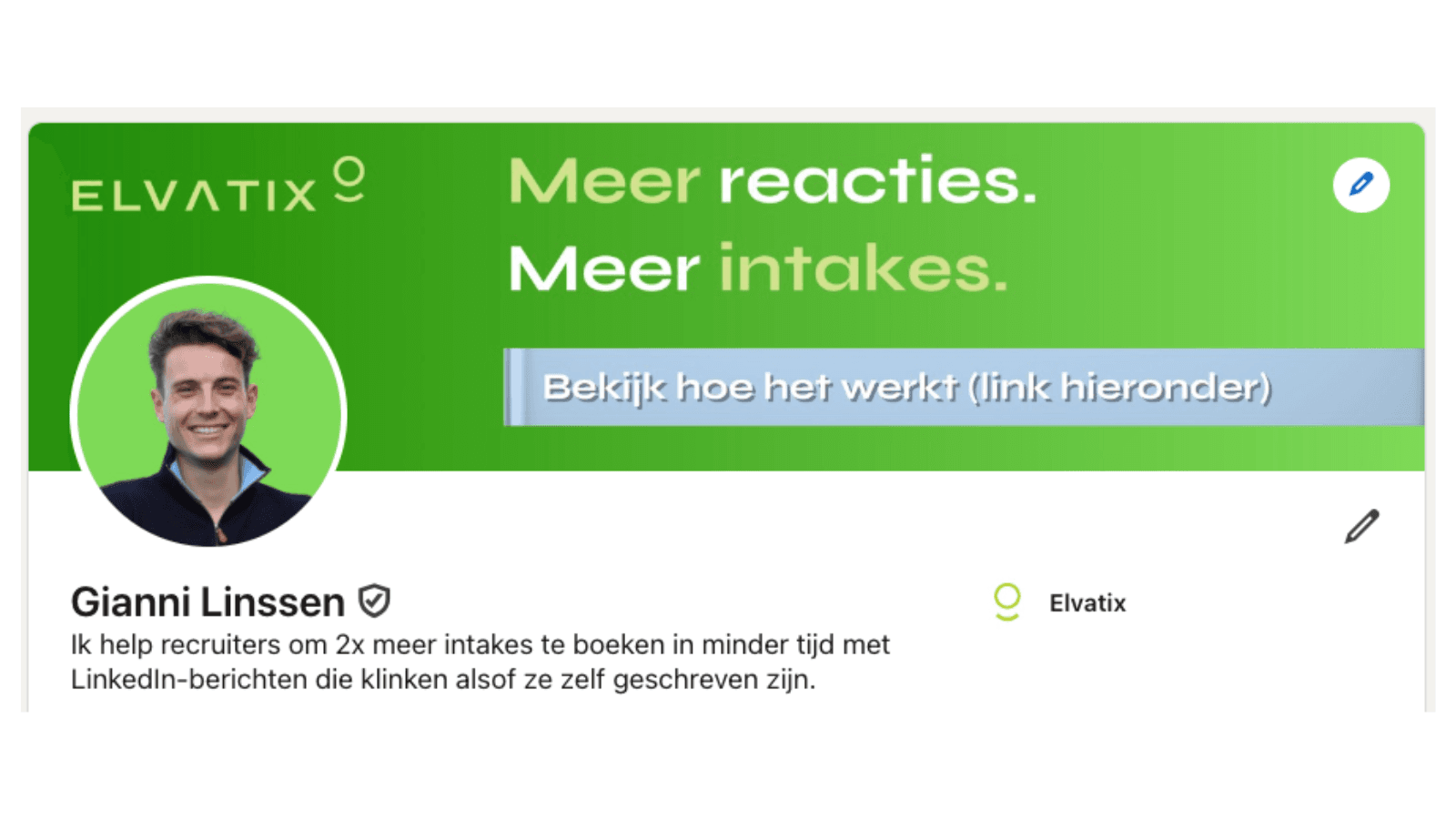
Profile optimisation counts twice: first the right keywords in your About section for findability, then your banner and headline for credibility.
A strong LinkedIn profile shows candidates and clients exactly who you are, who you work with and what you bring to the table, at a glance. That makes your profile far more than an online CV. It’s the first thing candidates and hiring managers look at before they ever reply to you. Get your profile right and you boost your visibility, build trust faster, and see more replies to your messages. Start with the right headline and photo, then work through every section of your profile from there.
This article gives you practical tips for optimising your LinkedIn profile for recruitment, complete with examples and a checklist. We’ll also show you how this feeds directly into your outreach.
- Your profile photo, headline and banner shape the first impression you make.
- Your “About” section and work experience should be short, clear and aimed squarely at your audience.
- Skills, recommendations and the “Featured” section all add extra credibility.
- A clear profile makes it easier to build the right connections on LinkedIn.
- Review your profile every quarter to keep it current.
Why recruiters need to optimise their LinkedIn profile
A candidate or hiring manager takes seconds to size up your profile. They’re looking for something they recognise and can trust straight away. That means it needs to be instantly clear what you do, who you work with and how you go about it. A professional LinkedIn profile doesn’t just improve how easily you’re found in search; it also shows you know exactly what you stand for. That makes people far more likely to respond, and it builds trust into everything you send afterwards.
A profile photo and banner that build trust
Make sure your photo is sharp and shows you looking friendly at the camera. Use a calm, uncluttered background. Your face should be front and centre, and instantly recognisable on mobile too. Avoid cropped group shots or selfies with filters. Your banner gives you space to make your specialism visual. Add text such as “Open to a conversation” or “IT recruitment in fintech”. That way, people know exactly what to expect at a glance.
A headline that makes your niche and role clear
Your headline is the first thing people see in search results or when you reply to a message. Skip internal job titles and use terms people actually recognise, such as “Recruiter | Data engineering in healthtech” or “Tech sourcer for scale-ups in Manchester”. Name your specialism and your audience in one short line. For agency recruiters, we explain here how to tailor this to your audience.
Tip: Elvatix gets more out of every InMail credit. Higher response rates, lower cost per contact.
See how →Writing your About section like a person, not a job advert
This is where you make it clear who you work with, what you do and how you go about it. Use four to six short, personal sentences. For example: “I help hiring managers in B2B SaaS find frontend developers. Mostly in London, sometimes remote. I like short lines of communication, straight talk and moving fast. Want to talk through a role or a team? Feel free to book a quick call.” Close with an invitation. Keep the tone consistent with how you write your messages.
Want more tips on tone and structure in your messages? Read how to keep personal InMails short and effective.
Optimise your LinkedIn profile with clear, results-focused work experience
For every role, show briefly who you worked with, where you made an impact and what the result was. Use bullet points and avoid long blocks of text. For example:
- 18 mid-level and senior developers placed per quarter
- Time-to-hire cut from 45 to 28 days
- Built the recruitment process for three healthtech start-ups
Use terms your audience actually recognises. So “Python developers for machine learning in retail” rather than vague job titles or internal jargon.
Skills and recommendations that back up your approach
LinkedIn lets you add up to 50 skills, but stick to 8 to 10 that genuinely match your profile and audience. Think “Talent sourcing”, “Healthtech recruitment” or “Interview coaching”. Also ask people you’ve worked with recently for a short, specific recommendation. For example: “Worked with Rachel to fill three finance roles in six weeks. Great communication and a decisive approach.” See how this works for recruitment agencies like Vibe Group.
Using the Featured section to showcase your work
The Featured section is where you show work that speaks directly to your audience. Add a link to a current vacancy, an intake form for hiring managers, or an article you’ve written. Pick two to three items that make your expertise concrete. Think along the lines of:
- “Vacancy: Frontend developer | React | Manchester area”
- “Hiring manager intake call checklist”
Use short, clear titles so it’s obvious straight away what you’re offering.
Optimise your LinkedIn profile to be easier to find
Change your profile URL to a clean, recognisable format such as linkedin.com/in/firstname-lastname. Set your profile to public so your name, headline and photo are visible. Check your contact options are filled in properly, such as your email address or a clear invitation to connect. People are far more likely to pass you on or add you when your profile looks professional and approachable.
Optimising your LinkedIn profile is step one; personal outreach comes next
Once your profile is clear and specific, you can start sending connection requests and InMails. How you describe yourself on your profile needs to match how you write your messages. That way you avoid confusing the other person and improve your odds of a reply. We make sure everything lines up: read more about our LinkedIn integrations. You select profiles and get message suggestions written in your own tone, with none of the robotic language.
Make maintenance a habit: review every quarter
Optimising your LinkedIn profile once a quarter keeps it fresh and relevant. Check whether your headline still matches your current roles. Swap out old work experience for recent examples. Review your Featured items: are they still current and recognisable? Look at your skills and recommendations too. Remove anything that’s outdated or no longer fits your focus.
Checklist: optimise your LinkedIn profile in 11 steps
- Profile photo: professional, sharp, friendly
- Banner: niche named, short text, calm background
- Headline: clear role, specialism and audience
- About section: short sentences, personal tone, with an invitation
- Work experience: bullet points and results that show your approach
- Skills: 10 maximum, relevant and aimed at your audience
- Recommendations: 3 to 5, focused on collaboration
- Featured: current content such as vacancies or tools
- Contact details: visible, with a clear way to reach you
- Profile URL: easy to share, personalised
- Privacy settings: public visibility for key sections
Profile sorted? Time for personal outreach
Once your profile is sorted, you can start building connections. Open with a short message that includes one recognisable hook, such as a shared network or a common interest. No reply? Wait a few days and send a single follow-up. Our software helps you keep these steps easy and personal. See how we support this within LinkedIn.
Want to talk through how your profile and messaging could work better together? Get in touch for a relaxed introduction call.
Frequently asked questions about LinkedIn profile optimisation
How do I optimise my LinkedIn profile as a recruiter?
Start with a good profile photo and a headline that makes your niche and audience clear. Then make sure your “About” section, work experience and Featured section all speak to your audience. Keep your profile relevant and use terms people recognise.
Which sections matter most in a professional LinkedIn profile?
The sections that make the biggest difference are your headline, profile photo, work experience with results, a personal “About” section and recommendations. Make sure your availability and contact options are clearly visible too.
How often should I update my LinkedIn profile?
Plan a short update every quarter. Check whether your headline, Featured section and work experience still match your current focus and roles. Add new projects if they’re relevant.
What’s the difference between being visible and being findable on LinkedIn?
You’re visible when people find your profile by searching your name, or when you send an InMail. You’re findable when your profile turns up in the searches candidates or clients actually run. To make that happen, use the terms they use too.
Write a personal message right here
Enter a name or LinkedIn URL and get a personalised message within 30 seconds. No account needed.
Is your profile in top shape?
Launch the perfect AI-written opening line straight from your polished profile with Elvatix, and dominate your target audience's inbox.